从前,background-image只能是图片或色块;现在,你能够通过代码来绘制背景图片了,可以简单理解为background-image支持canvas。

这张星空背景是background-image,但是里面的星星是动态生成的,实现起来非常简单,写法和canvas雷同。
在开始之前,要先去chrome://flags把Experimental Web Platform features改为enable。
CSS
.wrap{background-image: paint(star-bg);}
JS
CSS.paintWorklet.addModule('js/star-bg.js')
JS部分要以添加模块的方式引入,由于涉及到请求其他文件,需要放到服务器端查看效果。
// star-bg.js
registerPaint('star-bg', class {
  /**
   * 在paint方法里绘制图像
   * @param ctx 画笔
   * @param size 画布尺寸
   * @param properties css自定义属性
   */
  paint (ctx, size, properties) {
    const w = size.width
    const h = size.height
    // 绘制黑色背景
    ctx.fillStyle = '#000'
    ctx.fillRect(0, 0, w, h)
    // 绘制星星
    const rad = Math.PI * 2
    for (let i = 0, num = (w + h) / 4; i < num; i ++) {
      const x = Math.round(Math.random() * w)
      const y = Math.round(Math.random() * h)
      const r = Math.round(Math.random() * 5)
      const a = (Math.round(Math.random() * 90) + 10) / 100
      ctx.beginPath()
      ctx.fillStyle = `rgba(255, 255, 255, ${a})`
      ctx.arc(x, y, r, 0, rad)
      ctx.fill()
    }
  }
})
在引入的js文件中无法访问dom和大部分全局函数,如setInterval,requestAnimationFrame等;
当浏览器窗口尺寸发生变化时,会执行paint方法重新渲染。
结合css自定义属性
想要更灵活地定制效果,可以结合css自定义属性实现,十分强大。
.wrap{
  --star-size: 10;
  background-image: paint(star-bg);
}
registerPaint('star-bg', class {
  static get inputProperties () {
    return ['--star-size']
  }

  paint (ctx, size, properties) {
    const maxSize = properties.get('--star-size')
    // ...
  }
}
自定义属性值发生变化时也会执行paint方法进行重绘。
至于兼容性…
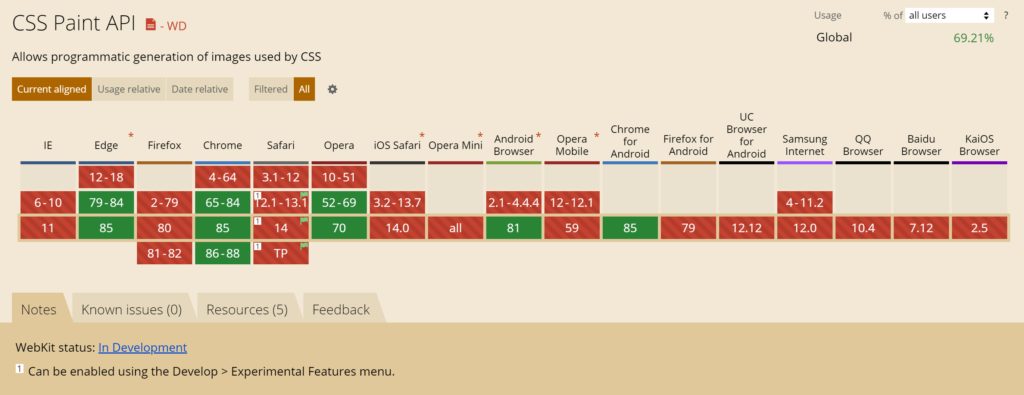
十年后就能用上啦✖️
十年后也用不上✅
IE:看谁不起呢老弟
Edge Yes❕